



FactorLab · SmartTagIt
Design the moments around an AI answer.
For SmartTagIt’s Flint assistant, I connected question entry, waiting and recovery into an annotated design handoff.
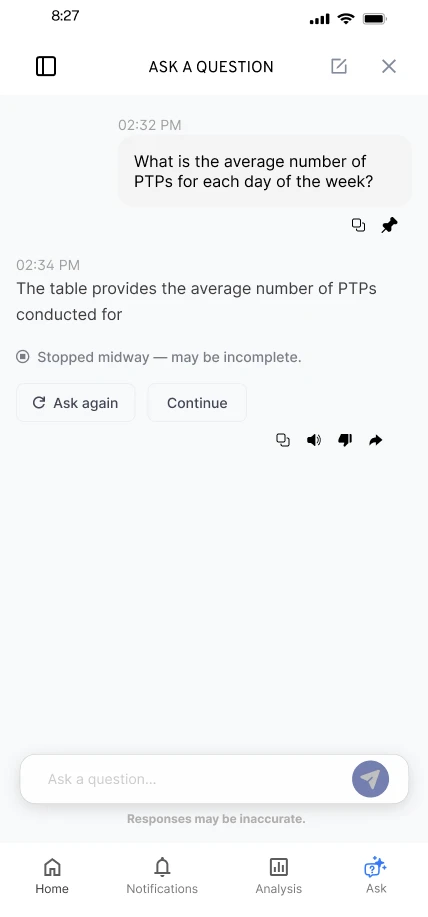
- My role
- UX Designer & Researcher (Contract)
- Period
- 2025–2026
- Platforms
- Mobile and desktop
At a glance
- Problem
- An AI chat needs a clear starting point, a visible wait, and the right response when a connection or an answer fails.
- My contribution
- Mobile and desktop conversation flows for suggested questions, waiting, interrupted answers and saved questions.
- What happened
- An annotated handoff for engineering. In August 2026, engineering reported that Ask a Question’s error states followed the approved designs.
States in the handoff
Portfolio explanation, arranged from the original exports below. Not an original project artifact.
Ask
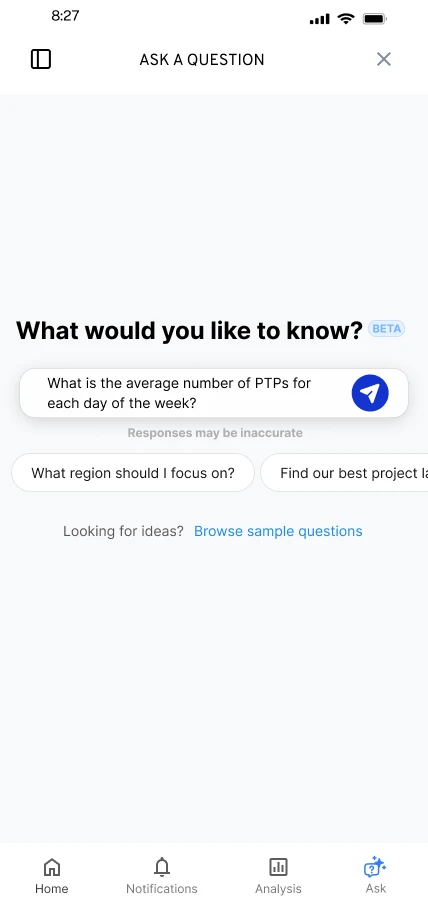
Suggested questions, or a suggestion placed in the input to edit
Next Send, edit, or browse sample questions
Wait
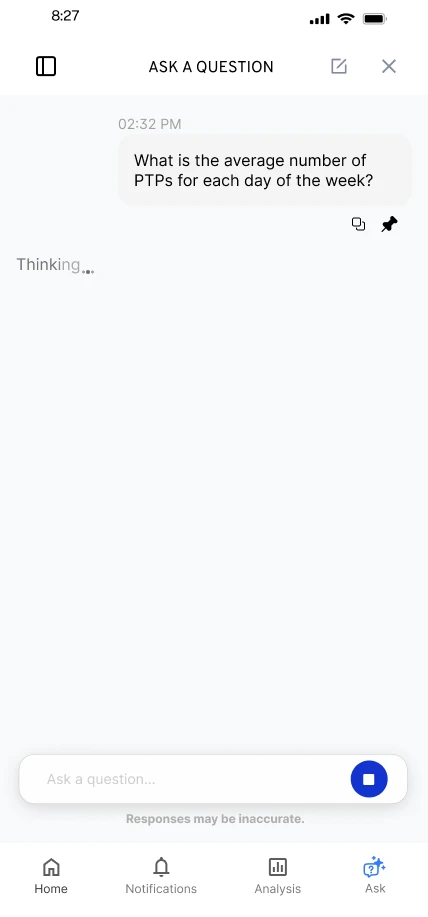
Response in progress, shown inside the conversation
Next Stop the response
Recover
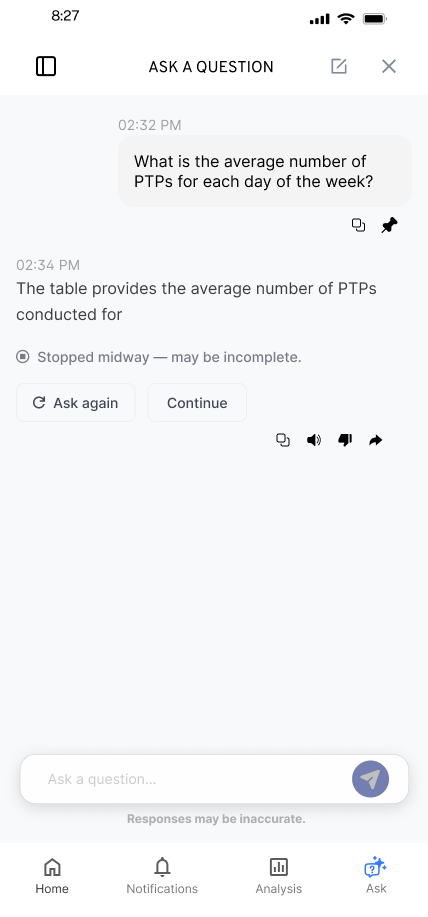
Answer stopped midway
Partial answer flagged as possibly incomplete
Next Ask again, or Continue
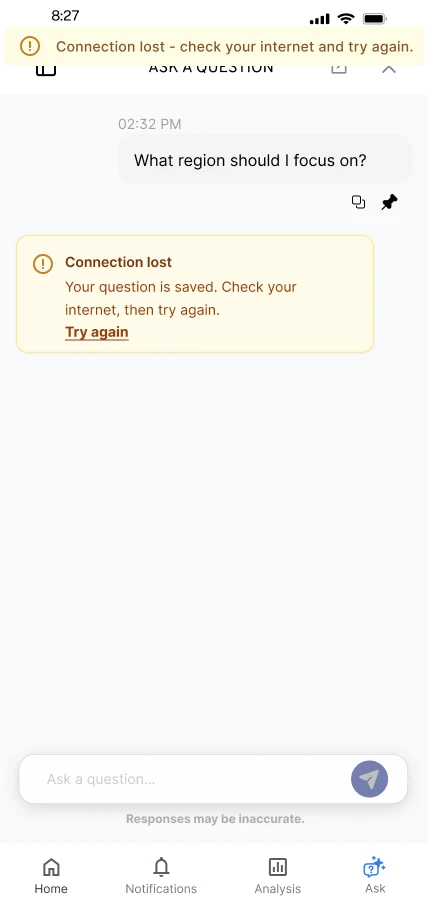
Connection lost
The question is saved
Next Try again
This summary covers the entry, waiting and recovery designs shown below.
Make the first question easier to ask.
An empty conversation asks people to work out both what to ask and how to begin. I explored suggested questions and a question library as starting points, while keeping space for people to ask their own question.
DecisionA selected suggestion fills the input, so people can check or edit it before sending.
Reasoning and tradeoffs
Why this mattered
The starting screen offered practical prompts alongside the input. In my walkthrough, selecting a suggestion filled the question field. That made the suggestion a starting point people could inspect and edit.
The options
I explored different treatments for the suggestions, access to a larger question library, and access to pinned questions. The library was a separate flow, so the first screen did not need to carry every possible question.
The tradeoff
The same question can depend on earlier context. In the pinned-question flow, I explored asking whether to include the previous conversation context, with an alternative that let people edit the question to supply the context they wanted. That choice was still optional in the design review.
Give waiting a visible state.
While Flint prepared an answer, the interface needed to show that the request was in progress. I explored that state within the conversation and worked through animation constraints with the product lead.
DecisionShow progress inside the conversation with a way to stop, and settle the final animation with engineering.
Reasoning and tradeoffs
Why this mattered
The conversation needed an in-progress state between submitting the question and receiving an answer. I explored a sequence of loading visuals within the conversation, alongside a way to stop the response.
The options
The walkthrough describes animation between states, with the exact treatment dependent on technical constraints. The still screens show those visual options; they don’t claim the interface reported the AI’s actual processing stage.
The tradeoff
Keeping the answer layout familiar focused the iteration on what happens before and around the answer. The final animation and timing needed to be worked through with engineering.
Match the recovery to what actually happened.
A lost connection, an answer that never starts, and an answer that stops midway are different situations. I designed distinct messages and actions: retry a saved question, ask again, or continue an incomplete response. The next action follows the state of the conversation.
DecisionGive each failure its own message and next step: Try again after a lost connection, Ask again or Continue after a partial answer.
Reasoning and tradeoffs
Why this mattered
The March 27 handoff separated conditions that could otherwise collapse into one error. Losing the connection, stopping before an answer appears, and stopping after part of an answer is visible leave people in different situations.
The options
Retry the saved question after a connection loss; ask again when a response has not completed; or offer Ask Again and Continue when a partial answer may be incomplete. The walkthrough also covers opening the question area while already offline.
The tradeoff
Recovery could not stop at the first failure message. I specified that retrying while still offline should produce a banner. Submitting a newly typed question was another route out of the connection-loss message. The design therefore had to cover the next attempted action as well as the original failure.
What the work produced
A connected handoff, from first question to recovery.
I brought the entry, waiting, saved-question, and recovery flows together in an annotated handoff for engineering. In August 2026, engineering reported that Ask a Question’s error states followed the approved designs.
Why it matters for your project
When your product has several system states, the handoff needs to explain what each one means and what a person can do next. This work shows how I make those interactions concrete enough for engineering review.
Evidence and delivery stage
Original Figma exports and project walkthroughs, including the March 27, 2026 error-state handoff, with an August engineering update. The report supports Ask a Question’s error-state implementation, not every pictured variant or measured user impact. Screens show original design variants with sample content.
Bring the flow that needs a second look.
Tell me what your team is trying to make clearer. We can start with the problem you have today.